Log on with an offline recovery code
This section describes how to log on to your Mac temporarily using only a password, by entering an “offline recovery code” received from your administrator when you cannot use your security key.
What is an offline recovery code
An offline recovery code is a 20-character code that lets you log on to your Mac temporarily with only a password, without using a security key. You enter a code issued by your administrator on the logon screen.
Codes are in the format RC-XXXX-XXXX-XXXX-XXXX-XXXX. To use one, ask your organization’s administrator to issue a code.
Because verifying the code requires no communication with the server, it can be used even while your Mac cannot connect to the network. It is a way to avoid being locked out of your Mac when your security key is forgotten, lost, or broken.
Difference from emergency logon
Emergency logon is another way to allow logon with only a password, but it becomes effective only once your Mac receives the setting made by the administrator from the server. If your Mac cannot connect to the network, it cannot receive that setting and emergency logon cannot be used.
An offline recovery code does not require receiving any setting, so it can be used on an offline Mac.
Scope in which the code can be used
An offline recovery code is tied to the combination of the Mac and the account that the administrator specified when issuing it. It cannot be used on another Mac or for another account.
A code also has an expiration date (3 days at most).
Operation procedure
-
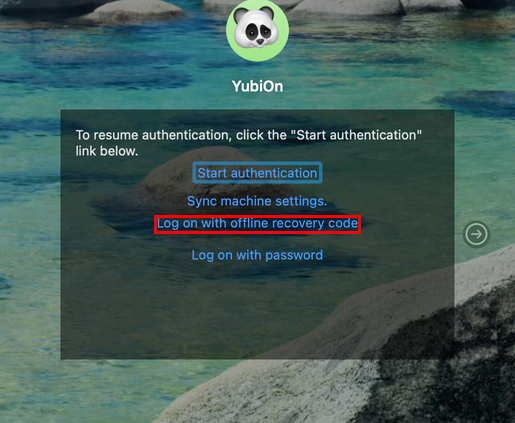
While authenticating during logon, click the “Log on with offline recovery code” link shown on the screen.
-
If the account to log on with has not been identified, you are prompted to enter the account name. Enter the name of the account you want to log on with.
-
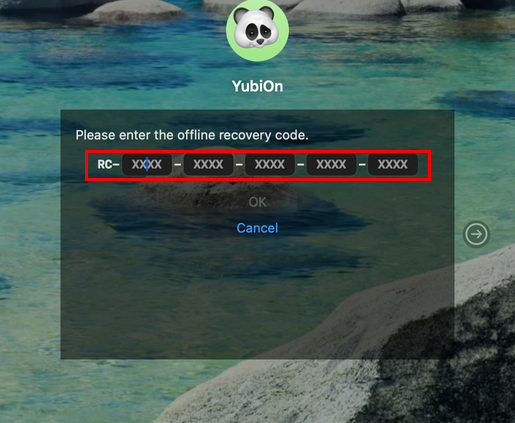
Enter the code received from your administrator four characters at a time in the five input fields that follow “RC-”, then click “OK”.
- Lower-case input is converted to upper case automatically.
- After four characters are entered, focus moves to the next input field automatically.
- Pressing the delete key while an input field is empty returns focus to the previous field.
-
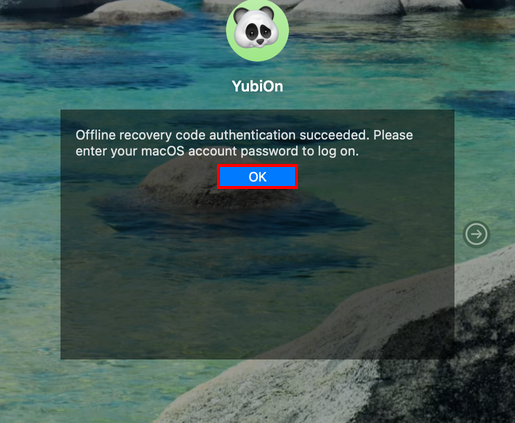
When “Offline recovery code authentication succeeded. Please enter your macOS account password to log on.” is displayed, click “OK”.
-
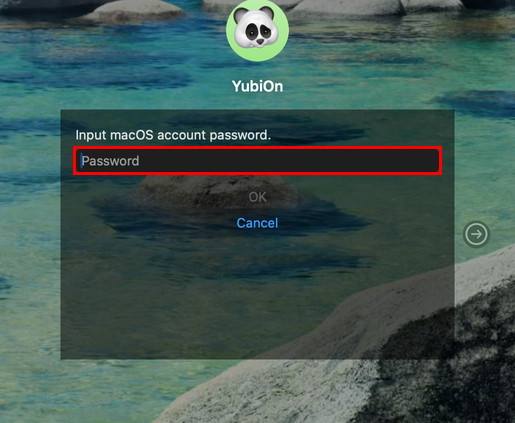
Enter the password of your macOS account to log on.
-
When the logon succeeds, the desktop is displayed.

Using it from the PC lockout screen
The “Log on with offline recovery code” link is also shown on the PC lockout state screen.
If the code is not accepted
| Message displayed | What to do |
|---|---|
| The offline recovery code is incorrect. | Check the code you entered. A code can only be used with the combination of Mac and account specified when it was issued |
| The offline recovery code has expired. | Ask your administrator to issue a new code |
| Temporarily locked due to reaching the maximum number of failed attempts. Please try again after 3 minutes. | You have failed to enter the code five times in a row. Wait about three minutes and try again |
This is not the PC lockout state
The three-minute lock above only stops offline recovery code entry; it does not put your Mac into the PC lockout state. Wait about three minutes and you can enter a code again.
However, if you repeatedly mistype the password after the code has been authenticated, your Mac may enter the PC lockout state, depending on your organization’s settings.
Logging in with only a password is temporary
Logging in with an offline recovery code is a temporary measure for when your security key is unavailable. Once you can use your security key again, log on with normal FIDO authentication.