See the detail log
This section describes the operations for viewing the detailed authentication log.
Operation Procedure
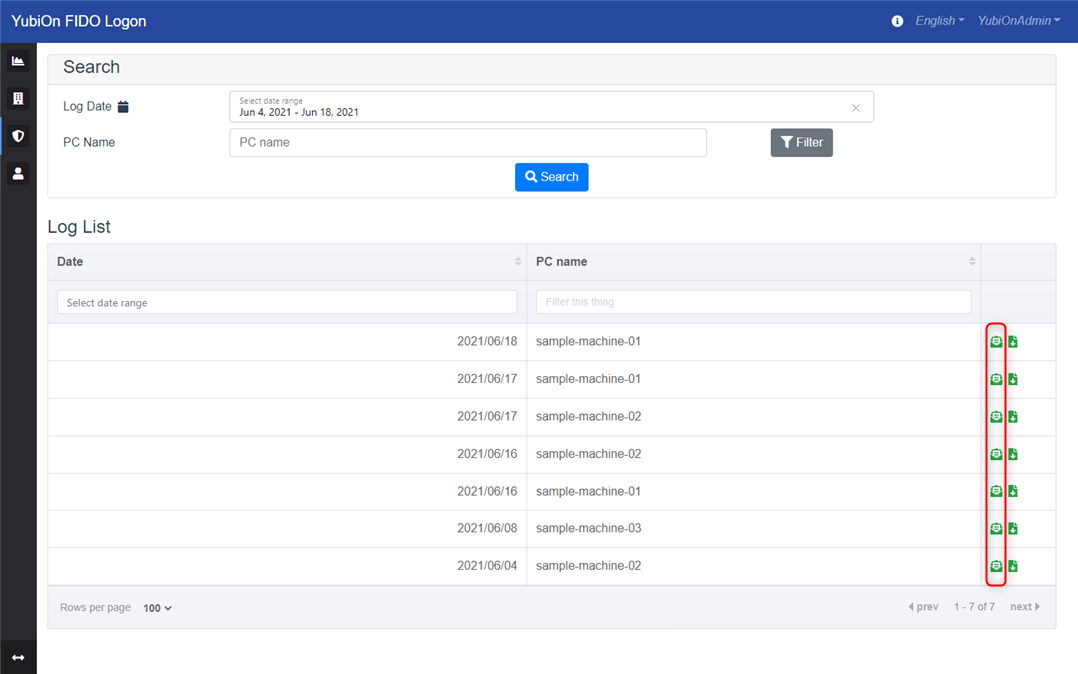
Select Authentication Service > Log from the menu.
- Enter a search field to search the log.
- Click the detail icon of the log you want to view from the log list.
- Confirm what is displayed in the log details.
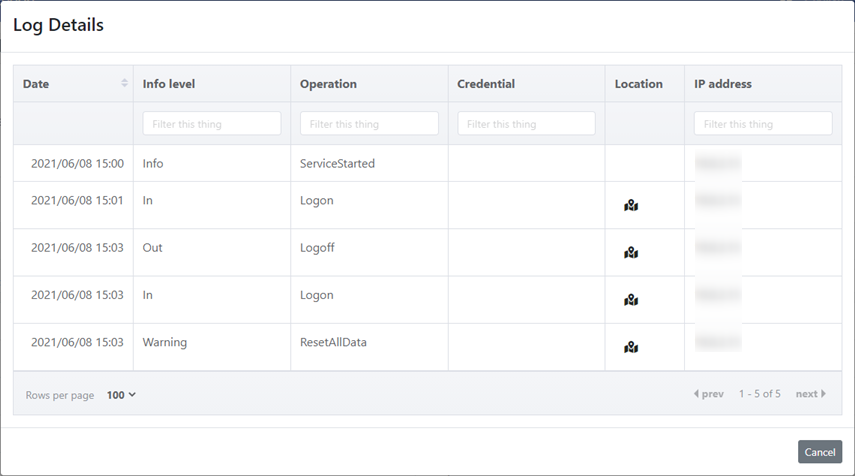
Log contents
-
Date
Displays the date and time of log writing. -
Info level
Displays the information type.Value Contents Remarks Warning Warning Operations that may pose a security problem In Start using the PC Operations to start using the PC Out End of PC use Operations related to terminating the use of a PC Info Other information Other operations considered to be within the scope of normal use Unknown Unknown Unintended behavior of the program
- Operation
Displays the operations that have been performed.Value Contents Info level ServiceStarted Starting background services Info ServiceStopped End of background service Info Suspend Suspend PC Info Resume PC Resume Info Logon Windows logon In Logoff Windows logoff Out ScreenLock Windows screen lock Out ScreenUnlock Windows screen unlock In ServerAuthSucceeded FIDO server authentication succeeded Info ServerAuthFailed FIDO server authentication failure Warning CacheAuthSucceeded Successful FIDO cache authentication Info CacheAuthFailed FIDO cache authentication failure Warning EmergencyLogonSuccessed Emergency logon successful Warning EmergencyLogonFailed Emergency logon failure Warning OfflineRecoveryAuthSucceeded Offline recovery code authentication succeeded Warning OfflineRecoveryAuthFailed Offline recovery code authentication failed Warning OfflineRecoveryLogonSuccessed Logon with offline recovery code succeeded Warning OfflineRecoveryLogonFailed Logon with offline recovery code failed Warning AuthSucceeded Authentication success Info AuthFailed Authentication failure Warning FailureLockout PC Lockout Warning AuthenticatorUnmounted Authentication device removal Info CredentialRegisteredAtLogon Authenticator registration at logon Info CredentialRegisteredOnSettingTool Authenticator registration on configuration tool Info CredentialDeleted Authenticator deletion on configuration tool Info ResetAllData All data reset Warning Unknown Unknown Unknown
-
Account
Displays the account that performed the operation. -
Authenticator name / Recovery code
Displays the name of the authenticator used during FIDO authentication.
For offline recovery operations, part of the entered recovery code is set, in the formRC-XXXX-...-YYYY.
About the value displayed
For logs prior to October 2024, the authenticator name field is set to the ID of the authentication information (CredentialID).
-
Location information
Location information obtained (only if available)
Click the icon to display the location information. -
IP address
IP address will be displayed. (Only if you were able to obtain one)